

How To Create Er Diagram In Mysql Workbench
Database
My Journey to Connect MariaDB to MySQL Workbench
My boss asked me for an ER diagram from a schema saved in MariaDB.

I happened to have to extract the Entity-Relationship diagram starting from the SQL schema. I usually use XAMPP to work in SQL so I told myself to try using the Designer tool provided by PhpMyAdmin. In truth, the result was not great. My database had over 20 tables and the Designer showed them all stuck on top of each other. Furthermore, the PhpMyAdmin Designer is a very basic tool, which does not allow you to automatically align the tables to make them more readable.
However, since m y boss had asked me to produce this blessed ER diagram, and not have the desire to manually move the tables one by one in the graph, I thought about using MySQL Workbench. I remembered from distant reminiscences that MySQL Workbench provides a very powerful tool for the automatic conversion of SQL schemas into ER diagrams. The tool in question is called Reverse Engineering.
And here the problems arose. Getting MariaDB (database provided by new versions of XAMPP) to talk with MySQL Workbench was not a very simple operation. But I want to eventually make it.
And I want to tell you how I succeeded.
First of all, I had already pre-installed on my computer (a Mac OS) the latest version of XAMPP (7.3.33 at the time of writing this article), so I had no desire to downgrade to a previous version with MySQL DB installed, as suggested in some posts on StackOverflow.
First Attempt 😱
I downloaded the latest version of MySQL Workbench (8.0.27 at the time of writing this article) and installed it.
My first attempt was to have MariaDB speak directly to MySQL Workbench. I started MariaDB from the XAMPP control panel:
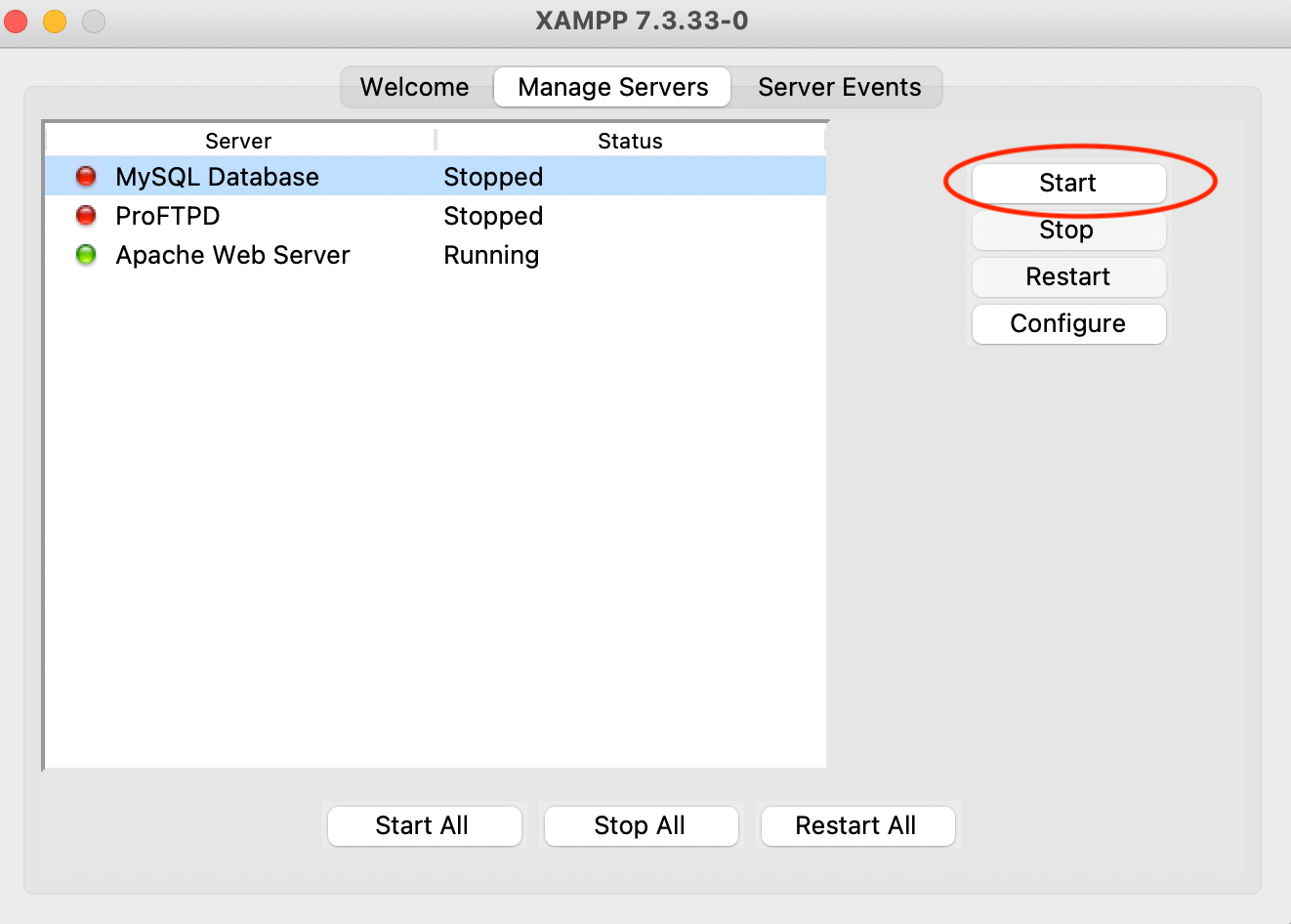
When the server is active, the light next to its name turns green. Then I started MySQL Workbench and clicked on the + sign to create a new connection:

I added the connection parameters, but when I tried to press the Connect button, miserably the connection failed, as it required configuring SSL.
Second Attempt 😢
So I googled a bit and found how to configure SSL in Maria DB. I found a fairly complex procedure described in this article. But to tell the truth, I got a little scared. So I gave up.
Wandering around the connection configuration tabs of MySQL Workbench, however, I discovered the existence of a wizard (under the SSL tab) that allows you to automatically generate keys and certificates.

By following the wizard procedure, it is possible to generate the various certificates. I have put the checkmark in the Use Default Parameters item.
Once the procedure is completed, you can access the files by clicking the Files button, located immediately below the Wizard button. I copied the files to my local folder and then moved on to the Maria DB server configuration.
From the XAMPP menu, I selected the MySQL server, and then I clicked on Configure, then on Open Conf File, and at the bottom, I pasted the text that is inside the my.conf.sample file, generated together with the certificates. The text in question is this:
          [client]
ssl-ca=<directory>/ca-cert.pem
ssl-cert=<directory>/client-cert.pem
ssl-key=<directory>/client-key.pem          [mysqld]
ssl-ca=<directory>/ca-cert.pem
ssl-cert=<directory>/server-cert.pem
ssl-key=<directory>/server-key.pem
I replaced <directory> with the path to my directory. I restarted the SQL server, which started quietly.
I then went back to MySQL Workbench and created a new connection. This time I have configured all the required SSL parameters, in the appropriate spaces indicated in the SSL tab.

This time I try the connection and … the MySQL Workbench gives me a Warning (see side). I click on Continue Anyway and everything seems to work fine.
Exactly it seems.
I can see all databases stored on my SQL server, but when I try to access individual tables, it tells me that it is unable to load them:
Tables could not be fetched — Error loading schema content
Sigh, even the second attempt, unfortunately, failed miserably …
Third Attempt 😌
But I don't lose heart. I try to google once again. And this time I find another StackOverflow thread where it strangely says that MySQL needs to be updated.
Having nothing to lose, and always having in mind my boss who wanted that ER diagram at all costs, I open a terminal and run this command, in the hope that it doesn't destroy everything:
sudo /Applications/XAMPP/bin/mysql_upgrade Something is moving. It looks like something is being installed. Ok, it's done. I restart the SQL server and everything works fine.
Then I go back to MySQL Workbench, I reconnect to the SQL server and now, I can finally see the tables! Wow! I'm happy!
I just have to launch Reverse Engineering and that's it!
But no. The system crashes.
Nooo! It looks like an old odyssey. But I don't give up, I can do it. I have to do.
I always think about that ER diagram that I have to bring to my boss.
In truth a bit of demotivation comes to me … maybe, I think to myself, I could reuse the PhpMyAdmin Designer.
Then, however, I imagine myself moving all the tables by hand… no-no. I try to search again.
Fourth Attempt 😄
I keep googling non-stop until I come across this StackOverflow article, where it says that the Reverse Engineering crash issue is a known bug on Mac OS of the latest versions of MySQL Workbench. So if you install an older version, 8.0.21 at the latest, the problem should be solved.
Then I try. Uninstall the latest version, download 8.0.21, and install it. I try Reverse Engineering and everything works correctly! The tables are all perfectly aligned and require no manual effort to arrange them 😎
That's all folks!
For the record, I can't put a screenshot of the ER diagram produced here, for privacy reasons. Instead, I put the screenshot of a simple ER diagram that produced my Reverse Engineering:

Summary
In this article, I described my adventure in trying to connect Maria DB with MySQL Workbench, to take advantage of the Reverse Engineering tool provided by MySQL Workbench.
It was a long process, but I finally managed to produce my ER diagram. But this question remains:
Is it worth spending the time to make an automatic tool working or is it better to carry out a manual operation?
I honestly almost always prefer to invest some time to make an automatic procedure work. What do you think of it? If you want, feel free to leave a comment.
If you have come this far to read, for me it is already a lot for today. Thanks! You can read more about me in this article.
Related Articles
How To Create Er Diagram In Mysql Workbench
Source: https://towardsdatascience.com/my-journey-to-connect-mariadb-to-mysql-workbench-2d7e599a8a26
Posted by: kimblenovence.blogspot.com
0 Response to "How To Create Er Diagram In Mysql Workbench"
Post a Comment